Dynamic input forms and table views for custom logging
The DAQORE Custom Logs App is a solution for custom form inputs and visualization of manually logged data into IXON Cloud. Easily adjust the input mask and tabular output to your needs and start logging. Add, change and remove input fields without loosing existing data. Mathematical expressions (with operators and functions like +, -, *, /, (), sin, sqrt, etc.) can be configured to turn individual numerical inputs into meta data. Logged data can be filtered by time and exported by the users.
The manually logged data is stored inside your IXON company account and/or sent to a WebHook. The configuration of the input form fields and table view is done inside the Admin section of the IXON portal. Possible input field types are strings, texts, numbers, checkboxes, selections and dates. It’s possible to group input fields into sections. Input fields might be required or optional.

Documentation
The configuration is stored within the app settings in the Admin/Apps section of your IXON Cloud admin panel. The app settings follows a simple structure in YAML format.
"configurations":
  - "key": "uniqueKeyA"
    "inputs":
    "outputs":

  - "key": "uniqueKeyB"
    "inputs":
    "outputs":
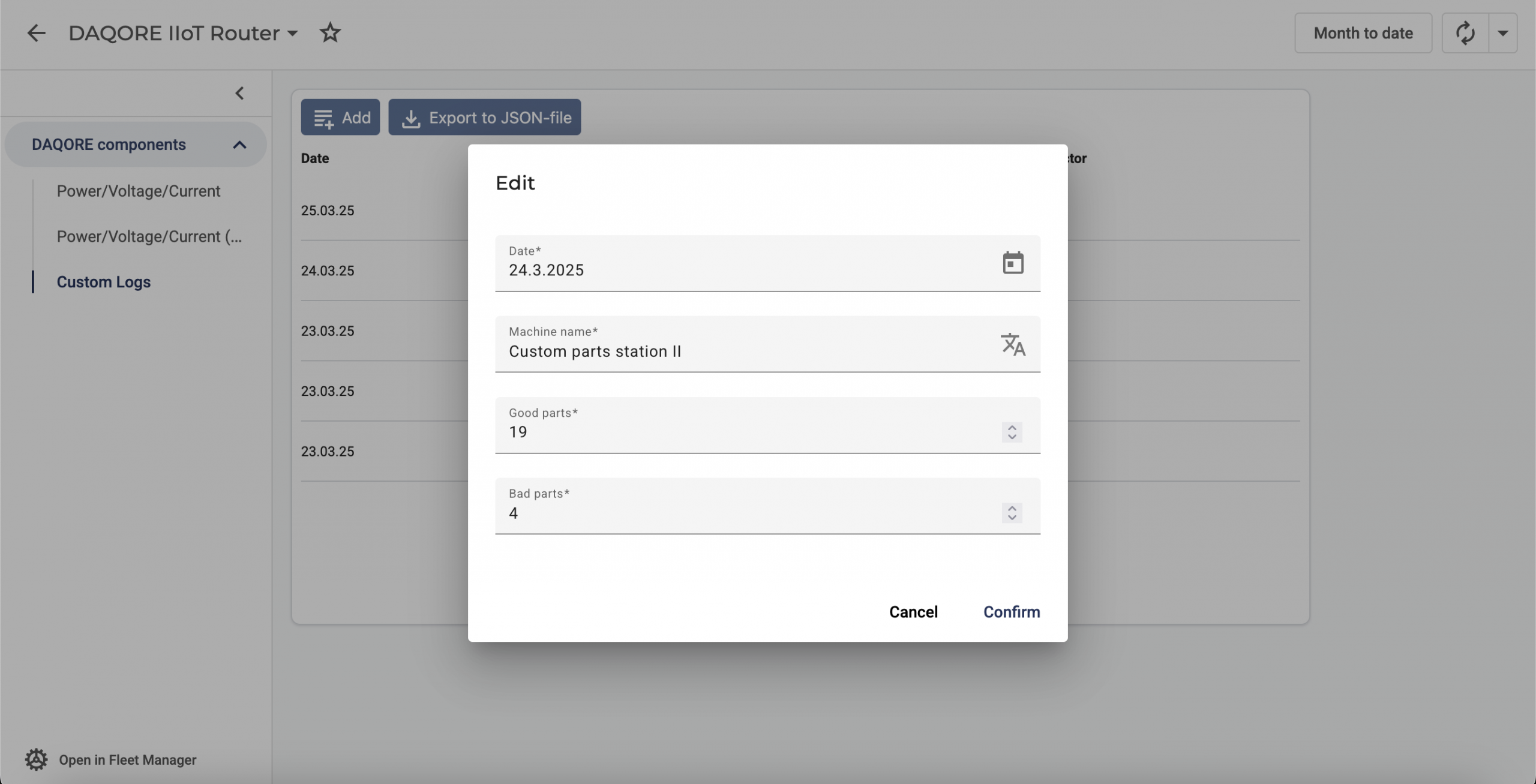
Each configuration needs to have a unique key, inputs and outputs. The unique key is the reference in the IXON Cloud Studio and defines which configuration will be linked to the UI component. The configuration key has to be entered in the UI component configuration. Each input defines one input element in the web form, whereas each output defines one column in the table view. A complete working example might look like the one below.
"configurations":
  - "key": "machinePerformance"
      "inputs":
        - "key": "machineName"
          "type": "String"
          "label": "DAQORE_CL_MACHINE_NAME"
          "required": true

        - "key": "numGoodParts"
          "type": "Number"
          "min": 0
          "step": 1
          "label": "DAQORE_CL_NUM_GOOD_PARTS"
          "required": true

        - "key": "numBadParts"
          "type": "Number"
          "min": 0
          "step": 1
          "label": "DAQORE_CL_NUM_BAD_PARTS"
          "required": true

      "outputs":
        - "type": "String"
          "label": "DAQORE_CL_MACHINE_NAME"
          "reference": "machineName"

        - "type": "Number"
          "label": "DAQORE_CL_NUM_GOOD_PARTS"
          "numDecimalPlaces": 0
          "reference": "numGoodParts"

        - "type": "Number"
          "label": "DAQORE_CL_NUM_BAD_PARTS"
          "numDecimalPlaces": 0
          "reference": "numBadParts"

        - "type": "Number"
          "label": "DAQORE_CL_PERFORMANCE_FACTOR"
          "numDecimalPlaces": 0
          "prefix": "pre"
          "unit": "%"
          "postfix": "post"
          "references":
            - "numGoodParts"
            - "numBadParts"
          "formula": "(numGoodParts - numBadParts) / (numGoodParts + numBadParts) * 100"
You can define as many configurations as you like, as long as they have unique keys. You can also output as many table views on one device page as you like, given that they fit into the grid.
Inputs must contain a key, a type and a label. Other attributes are optional. Numbers, for instance, can be configured to have a minimum and maximum number, which automatically activates an input validation check in the web form. Outputs must contain a type, a label and a reference (to the assigned input). Placeholders with translation keys like {YOUR_TRANSLATION_KEY} can be used as labels for inputs and outputs.
Number input
- "key": "yourNumberInput"
  "type": "Number"
  "label": "Number input"
  "min": 0
  "max": 200
  "step": 1
Text input
- "key": "yourTextInput"
  "type": "Text"
  "label": "Text input"
  "placeholder": "Enter text"
Rich text input
- "key": "yourRichTextInput"
  "type": "RichText"
  "label": "Rich text input"
  "placeholder": "Enter rich text"
Boolean input
- "key": "yourBooleanInput"
  "type": "Checkbox"
  "label": "Yes or no?"
String input
- "key": "yourStringInput"
  "type": "String"
  "label": "String input"
Selection input
- "key": "yourSelectionInput"
  "type": "Selection"
  "label": "Options"
  "options":
    - "value": "small"
      "shortLabel": "Small"
      "label": "Small (really small)"
    - "value": "medium"
      "shortLabel": "Medium"
      "label": "Medium (something in between)"
    - "value": "big"
      "shortLabel": "Big"
      "label": "Big (really big)"
  "defaultValue": "small"
Date input
- "key": "yourDateInput"
  "type": "Date"
  "label": "Date input"
Date time input
- "key": "yourDateTimeInput"
  "type": "DateTime"
  "label": "Date and time input"
Number output
- "type": "Number"
  "label": "Number output"
  "reference": "yourNumberInput"
  "numDecimalPlaces": 0
Text output
- "type": "Text"
  "label": "Text output"
  "reference": "yourTextInput"
Rich text output
- "type": "RichText"
  "label": "Rich text output"
  "reference": "yourRichTextInput"
Any potentially unsafe content (e.g. HTML) will be removed during CSV export to help preventing Cross Site Scripting Security bugs (XSS).
Boolean output
- "type": "Checkbox"
  "label": "Boolean output"
  "reference": "yourBooleanInput"
String output
- "type": "String"
  "label": "String output"
  "reference": "yourStringInput"
Selection output
- "type": "Selection"
  "label": "Selected output"
  "reference": "yourSelectionInput"
Date output
- "type": "Date"
  "label": "Date output"
  "reference": "yourDateInput"
Date time output
- "type": "DateTime"
  "label": "Date and time output"
  "reference": "yourDateTimeInput"
Computation output
- "type": "Number"
  "label": "Performance factor"
  "numDecimalPlaces": 0
  "prefix": "pre"
  "unit": "%"
  "postfix": "post"
  "references":
    - "numGoodParts"
    - "numBadParts"
  "formula": "(numGoodParts - numBadParts) / (numGoodParts + numBadParts) * 100"
